Unofficial player guide
Poke Survivor Guide
Use this Poke Survivor guide to check controls, a stalled move evolution or saved progress. Ready to play? Open the creator's game below.
Opens the creator's game in a new tab · Free browser fan game · PC and mobile
Trying it as a guest? You can start without an account, but guest progress is not saved.

01 / Get started
Your first run
PokéSurvivor is a survivor-like Pokémon fan game. You control one partner, dodge the crowd and collect experience. Your selected move attacks automatically. Learning four moves does not make all four fire together; switch the active one when you need a different attack.
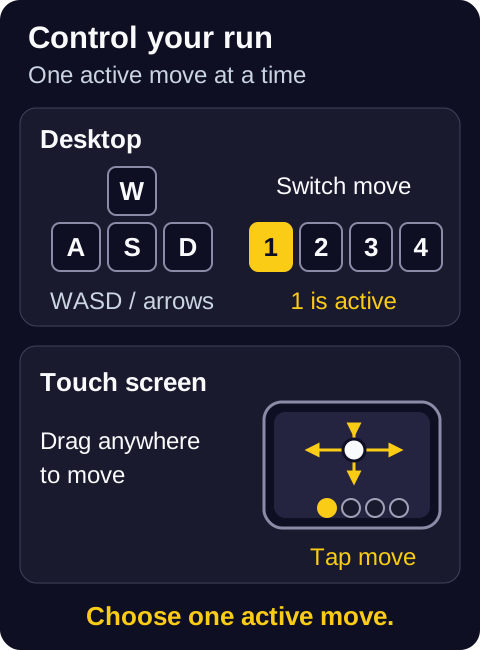
PC / keyboard
- Move
- WASD or arrow keys
- Switch move
- 1–4, Q/E, or click a move icon
- Pause
- Esc or P
Phone / touch
- Move
- Use landscape; drag anywhere on the game screen
- Switch move
- Tap a move icon at the bottom
- Pause
- Tap the top-right pause button
Tap not working? Check move-switching problems.
- Choose how to start. Select “Play as guest” on the creator's site to try a run. Guest progress is not saved; use an account if you want saved collection and upgrades.
- Answer the questions, choose a partner, then press Play. A fresh guest starts with eight personality questions. Accept the recommended partner or use “Choose another,” then press Play in the menu. Notice the partner's first move and learn how that attack behaves.
- Keep moving and collect nearby experience. Leave room to dodge. An experience orb inside a crowd is not worth taking a hit for.
- Read the level-up card. A new move, a move upgrade and a run stat boost change different things. Use the next section to tell them apart.
- Pause before coming back to the guide. Use the game's pause control; do not assume changing browser tabs pauses the run.
02 / Make the next choice
Upgrades and move evolution
Move won't evolve? Check these three things
Rules checked · Creator's move table
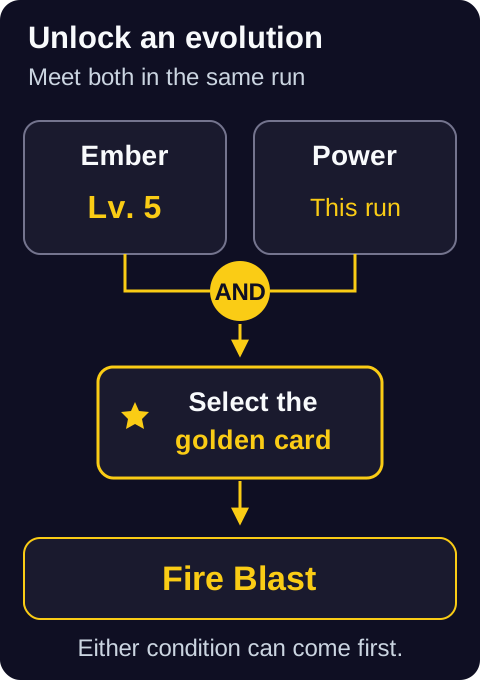
- Base move at Lv.5. This evolves the move, not your Pokémon.
- Required boost taken in this run. Match its exact name; a permanent menu upgrade does not count.
- Golden evolution card chosen. After qualifying, choose it at a later level-up.
The move level and run boost can come in either order. If you are still waiting:
- Check the boost name: Power and Sprint are different requirements.
- A boost from a previous run does not count.
- Buff moves and already evolved moves do not evolve.
- If several moves qualify, do not expect all their golden cards at the same level-up.
Which upgrade card should you take?
Collect experience to level up, then choose one of three cards. First check what the card actually changes:
- New move
- Adds a move from your partner's move pool when a slot is free. It gives you another option to switch into, not another automatic attack.
- Move upgrade
- Raises the level of a move you already hold, up to its cap. Keep an eye on the move you are using and its evolution requirement.
- Run stat boost
- Improves your partner for this run. Some of these named boosts also meet a move's evolution condition; menu purchases are separate.
Ember → Fire Blast, step by step
| Base move | Run boost | Evolves into |
|---|---|---|
| Ember | Power | Fire Blast |
| Water Gun | Power | Scald |
| Bubble | Sprint | Surf |
| Vine Whip | Power | Power Whip |
| Razor Leaf | Reflexes | Leaf Storm |
03 / Stay alive
Survive longer
Start with these actions from the creator's guide. They are a way to read the run, not a guaranteed winning build.
A crowd is closing in
Move in wide circles to draw enemies into a line and keep an escape route. Avoid cutting through a group just to collect more experience.
A ground marker is filling
Move out before the attack lands. Check for enemies healing others or giving them shields; the creator recommends dealing with these first.
An attack seems weaker than expected
Check the enemy's types and the weather before switching. PokéSurvivor softens the familiar type chart: super-effective is ×1.6, resisted is ×0.6 and a usual immunity is ×0.3. Dual-type results are capped at ×2.4. Use the game's own type chart.
You find a held item
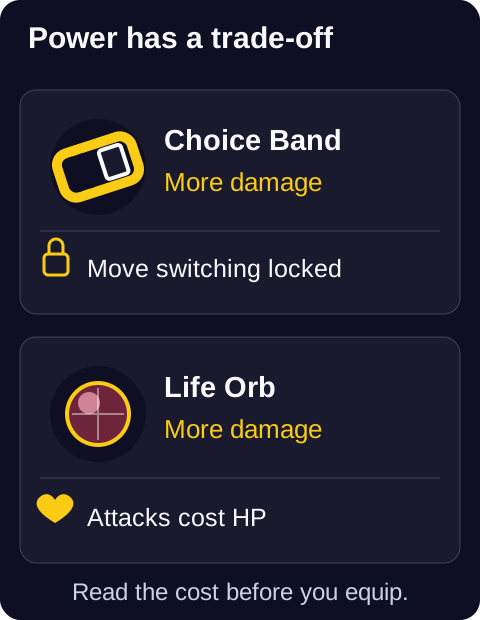
You can carry one at a time. Read the trade-off before replacing it: Choice Band locks move switching, while Life Orb costs HP when you attack. A useful damage boost may explain a sudden control or health change. Check held item effects.
A rift opens
Defeating the legendary inside gives you a bond choice. Bonded moves fire together from one slot, which is the exception to one active move. Entering a rift alone does not grant a bond; do not assume every bond or item-selection screen pauses combat.
04 / Between runs
After your run
Before spending rewards, separate your current run from the upgrades in the menu:
- Run build
- The moves and stat cards chosen during a run. These are not the same as permanent shop upgrades.
- PokéCoins
- Used for permanent upgrades in the menu. Those upgrades belong to the selected Pokémon; changing partners does not transfer them.
- Tickets
- Earned by playing and spent on regional gacha banners to obtain partners. The creator says tickets cannot be bought with real money.
- Saved progress
- The creator describes account saves for collection, upgrades and progress. Guests do not save. Saving those records does not prove a running session can resume after a refresh.
Closing a tab is not pausing a run. Check the account and save information on the creator's site before ending a session. Do not clear browser data as a first attempt to fix a problem.
05 / Check the symptom
Find an answer
Start with the rules below. If they do not explain what you see, follow the linked player report rather than assuming the game is fixed.
My Pokémon isn't attacking
Check the active move first. A Buff such as Swords Dance boosts a stat but deals no damage. Switch to a damaging move when you need to attack. If the controls themselves will not respond, use the next check.
I can't switch moves
On PC, try the move icon or 1–4; on touch, use the bottom move icons. Then check your held item: Choice Band deliberately locks switching.
Players also reported touch input taking over move taps on Oct. 11–13, 2026. These reports were open when reviewed; landscape is the intended layout, not a verified fix. Read the mobile report.My move is maxed, but won't evolve
Compare its required run boost with the five examples above. Check that the boost was taken in this run and that the move has an evolution. You still need to choose its golden card. Go to the evolution checks.
I lose HP when I attack
Check for Life Orb. It boosts damage but spends HP with each attack. Lava and enemy hits can also hurt you; the held item is one possible cause, not an explanation for every loss of health.
I refreshed and lost my run
Guest progress is not saved. With an account, permanent progress and the state of a run are different things. This guide does not promise that your current run can be restored.
Players reported losing runs after refreshing or closing a browser. Read the refresh report; do not treat a cloud-save description as a resume guarantee.I take hits while choosing a bond or item
A player reported combat continuing during these choices in a rift. Do not rely on all selection menus pausing the run.
Reported Oct. 11, 2026; not reproduced here, and no verified workaround is claimed. Read the selection report.Co-op is stuck at a choice screen
The creator describes rooms for up to four players. Connection and multiplayer failures need separate investigation; the single-player controls above do not diagnose them.
A player reported a freeze during skill selection on Oct. 13, 2026. Read the co-op report or use the author's issue tracker. No recovery method is verified here.06 / Before you leave
A few quick questions
Do I need to download it?
No download is needed to play in a browser. The creator also describes “Add to Home Screen” as an app-like option. This guide does not distribute or verify third-party APKs.
Can I use English?
The game supports English and Spanish based on browser language, with a choice in Settings. The link on this page goes to the creator's English entry page.
Where do I learn co-op?
Read the creator's co-op instructions for friends and rooms. This guide has not verified account sync or real multiplayer connections.
Sources and review notes
Sources reviewed . Controls, move evolution and held-item rules were checked against the creator's guide and deployed rule files, with deployment marker 6c34b10db3. The game can change.
Desktop guest visits checked the first-run questions, partner selection, movement, pause, keyboard and icon move switching, and refresh. The refreshed guest did not retain the earlier session's progress. The full evolution sequence and Choice Band pickup were not completed in play; those rules were checked against the creator's documentation and code.
- Creator's getting-started guide
- Move effects and evolution requirements
- Held items and their trade-offs
- PokéSurvivor's type chart and weather
- Creator's source code and issue tracker
Player issues are reports, not reproduced fixes. This page does not claim real-phone testing, a complete tier list or a guaranteed recovery method. It is not affiliated with the creator or the Pokémon rights holders.
Send a correction if a step no longer matches your game.
Try it in the game
Already playing? Switch back to your existing game tab. Starting fresh? Open the creator's site below.
Play PokéSurvivorOpens pokesurvivor.com in a new tab.